Week 10: Create a Dashboard

Classwork

What Gender spends the most Time on certain Activities?

Do university students conform to gender stereotypes with time spent on activities? This visualisation shows the average hours per day females and males spend on different activities. This data was gathered from 59 university students over the course of one week, where they wrote down activities they participated in every half hour.
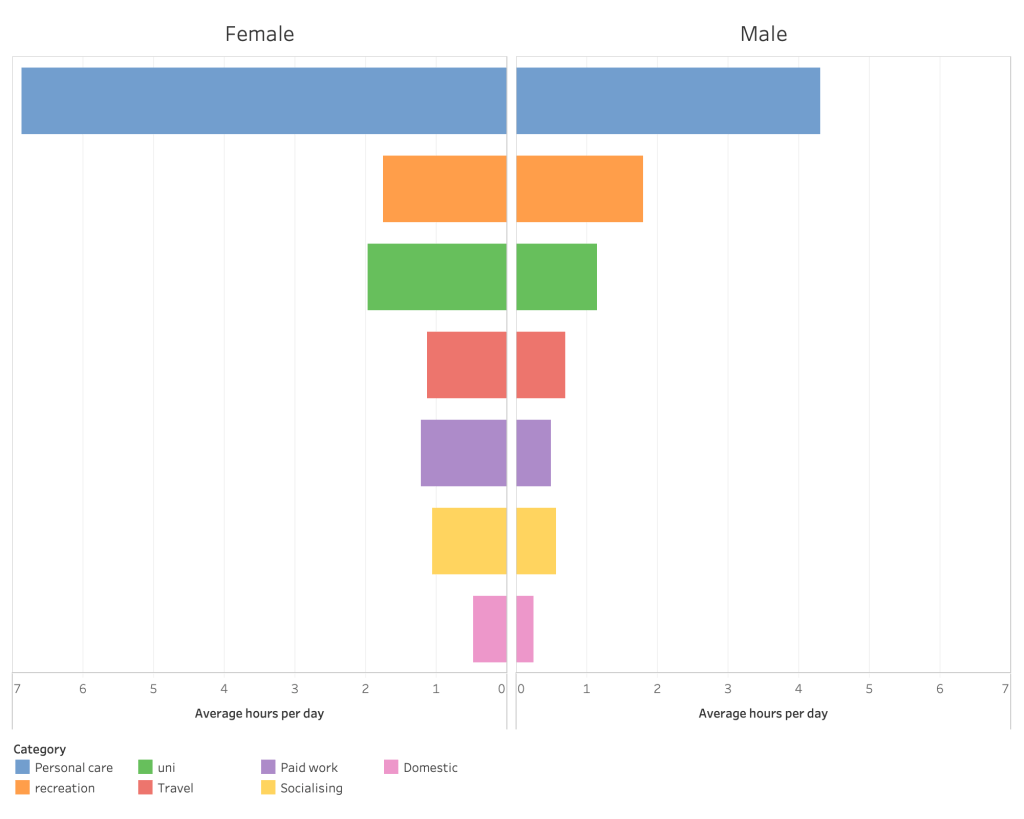
Note: There are more females than males in the sample space, so the results may be inaccurate as a representation of the population.

Visualising Data: Week 8

Lecture Notes

Art made of Storms

  • Nathalie Miebach talks about how she translates data into sculptures and music. She gathers her data and uses basket weaving to place values on different points of the basket. She then translates the data onto a musical score, where the piece can then be viewed, as well as performed by an orchestra. She shows her creativity when it comes to data, and the endless possibilities that can be created from data.

A Day in the Life of Americans

Analysis of a Data Visualisation
A day in the life of Americans [Image]. (No date). Retrieved from https://flowingdata.com/2015/12/15/a-day-in-the-life-of-americans/?fbclid=IwAR1J7MrL3QwK4fpeTiVMVmCYX5GvTTA61WqHJ86lQOOl-O8vEAQeyRLbNwo

What story does it tell?

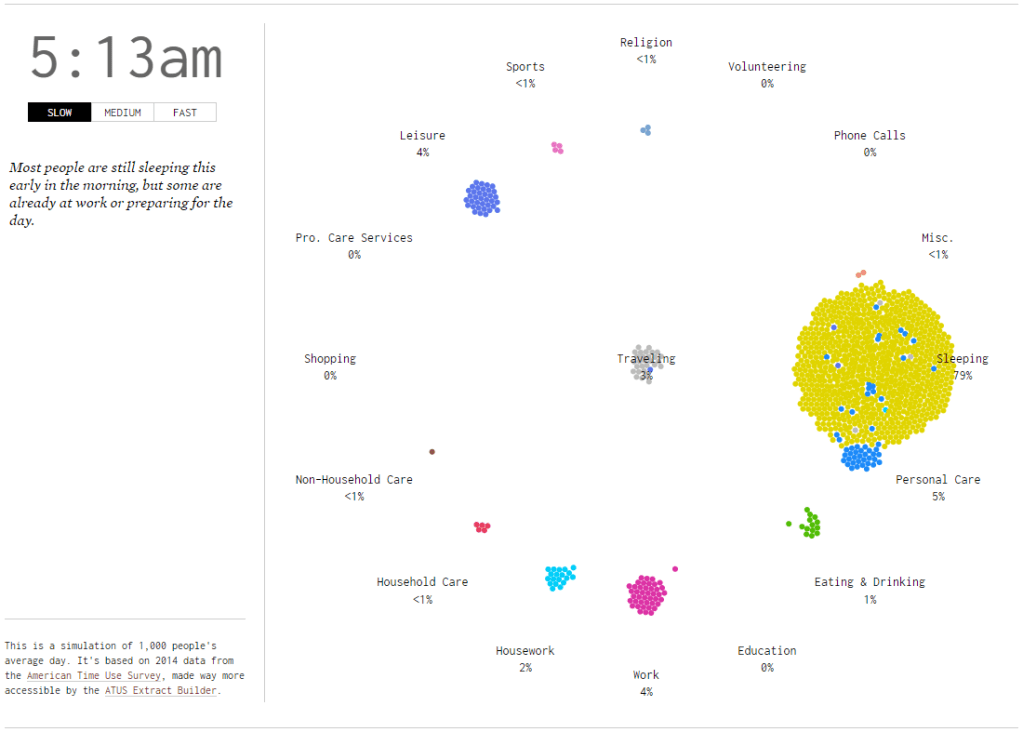
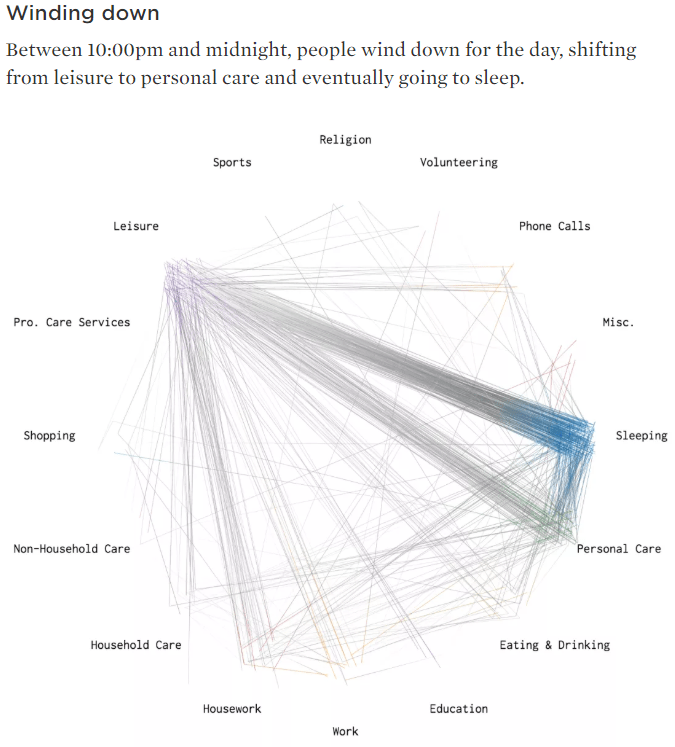
A day in the life of Americans shows am average of how Americans are spending their time each day to the minute.

How does it tell it?

The visualisation uses time-based motion graphics to simulate what activities people are participating through the day. Activities are separated into categories. There are 1000 bubbles to represent the American population. Bubbles move to a category each minute to represent what percentage of people are participating in that activity at the current time.

Does it allow for different levels of interrogation that can be seen or used on the part of the reader? eg can they drill down to discover more detail?

The reader has the ability to change the speed at which time progresses, with the option of slow, medium or fast. The visualisation itself does not go into much detail, however another link on the page takes you to another visualisation exploring the same data.

Are you able to create multiple stories from it? If so what are they?

Yes. You are able to create multiple stories from the percentages of people participating in different activities. For example, at 4am majority of people are sleeping, but by 9am majority are working. You can guess what time of day it is purely by what activity majority of people are participating in.
What can you say about the visual design- layout, colour, typography, visualisation style?

The visual design is aesthetically pleasing. It’s flat and minimalistic, which is essential when considering 3 different variables and allowing information to be easily distinguishable and read. For the most part, the layout is spaced out enough that it’s clear what bubbles are in which category, and the time and controls aren’t so far that they feel separate. The colours all work well together, and similar colours are spaced in a way that they’re easily distinguishable from each other. The typography is light and unobtrusive to the rest of the visualisation, while still being readable. The font chosen is a serif monospace typeface, which reflects old style statistics and factual information. The choice of visualisation works well to visualise people moving from place to place, and the circular format is evenly spaced.

What improvements would you suggest?

To improve the visualisation, I would suggest giving the reader more control over the time in the simulation, to be able to skip forwards or backwards in time or to pause at certain times. Also giving the reader the option to filter certain categories would also be helpful. Sometimes in the visualisation the bubbles appear to be in the wrong categories, which is unclear what it is trying to represent. This could represent multitasking, or bubbles could be getting stuck in the wrong categories, giving inaccurate representations of the percentages of people participating in certain activities. Also, when large amounts of people are doing one activity, such as sleeping, it clashes into other categories like personal care. I would suggest expanding the distance between the categories to help with this. Another improvement could be to expand the data over a week rather than one day, to give more information about time use and compare weekdays to weekends. Another idea might be to bring some of the author’s other visualisations together to be able to compare similar data sets.

Where does the data came from, and comment on it’s source.

The data used comes from the American Time Use Survey from 2014. It was conducted by the US Census Bureau, so the source is reliable but slightly outdated. The source also confines the data to the United States, so it would be interesting to see similar data sets for other countries.
https://flowingdata.com/2015/12/15/a-day-in-the-life-of-americans/?fbclid=IwAR1J7MrL3QwK4fpeTiVMVmCYX5GvTTA61WqHJ86lQOOl-O8vEAQeyRLbNwo

Visualising Data: Week 7

Lecture Notes

The Beauty of Data Visualisation

  • Figures alone aren’t effective for comparing data. Visualising data allows us to see the difference between data in a visual way that would otherwise have less impact as plain text.
  • Data visualisation allows us to see the patterns in data, and draw conclusions from it.
  • Design is about solving problems and creating elegant solutions, information design is about solving information problems.
  • David McCandless talks about his love for beautiful data and finding patterns and connections and shows us some of his graphs that are well refined and show interesting patterns.

Visualising Data: Week 6

Lecture Notes

Data Journalism

  • What is data journalism?
    • Data journalism uses gathered data to tell a story. It combines text with data, and allows it to be interactive. It creates stronger stories and allows the reader to process the data and visually see the facts and numbers of the story, rather than just the written words.
  • The evolution of data journalism
    • Some of the first data journalism examples are tables full of raw data.
    • Later, data journalism started to include visual aspects, using type to represent people or including small portions of maps.
    • In 1943, a picture graph was included in The Guardian to represent 10% of the military plane and tank production from January to March.
    • From newspapers, data journalism moved to digital mediums. This allowed for faster creation of data and interactivity in the data.
  • Data journalism in action
    • During the London Olympics, The Guardian wanted to create an interactive visualisation that could be constantly updated to show the amount of medals different countries had won, and adjust the numbers to make a more even scale. They also wanted the graph to be interactive so that the audience could sort the graph how they wanted, and could be updated as the Olympics went on and more medals were won.

Visualising Data: Week 4

Lecture Notes

Historical and Contemporary Visualisation (Part 2)

Why do we visualise?

  • To help us gain an insight and understanding into complex issues.
  • When faced with a large amount of data, it is hard for us to draw comparisons between conclusions. In the form of a graph, it is much easier to draw comparisons in a visual form. Therefore creating visualisations saves the audience time and effort trying to draw comparisons by creating comparisons for them.
  • The main goal of any graphic and visualisation is to be a tool for your eyes and brain to perceive what lies beyond their natural reach.
  • Rather than showing all the information available in a graph, it may be more useful to only show important information, to help the audience distinguish information.
  • Sometimes it is up to the designer to choose which information to show and what to hide, rather than leaving it all up to the computer. Designers can choose what information is useful and what just makes the graph confusing and cluttered.

Visualising Data: Week 3

Lecture Notes

Historical and Contemporary Visualisation (Part 1)

  • Data visualisation can reduce the time necessary for understanding a given event, but at the same time it augments the viewer’s capacity to grasp and interrelate the complex data. Data visualisation presents its audience with tools to be able to analyse and make comparisons for themselves with the data.
  • Leon introduces some early forms of data visualisation, including visualisations from Charles Joseph Minard, Florence Nightingale and Otto Neurath.
  • Minard created a visualisation of the strength of Napoleon’s army as he invaded Russia. The army’s forces died down very quickly due to the extreme cold temperatures and lack of food for horses. The visualisation depicts Napoleon’s army where it starts around 400,000 as it depletes to around 10,000. As an early visualisation, it is a bit difficult to follow, but there is a lot of information available in the graph.
  • Florence Nightingale recorded the deaths and causes of death during the Crimean war, while she was working in the hospitals. She recorded that majority of the deaths were due to disease, rather than battle inflicted or other causes of death. She was able to use this information and present it to improve the standards in the hospitals. Her graph is well known, and allows the audience to easily compare the amount of deaths, causes and change over time.
  • Otto Neurath created a museum for visualisations, and introduced the serialisation of images, where multiple images of the same size can be used to represent a larger quantity. Neurath also brought visualisation to an industrial scale, where printing presses were used.

Visualising Data: Week 2

Lecture Notes

Data Types

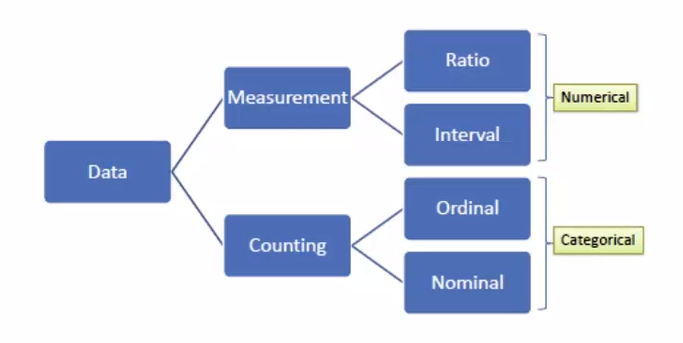
  • Nominal: Pertaining to names. For example, section of store different items are found in. Usually not ordered, categories. Can be counted and percentages can be found, but you cannot find an average.
    • Dichotomous: When there are only 2 categories, such as yes or no questions. Eg. Are carrots on sale? The answer can only be yes or no, making it dichotomous.
  • Ordinal: Ordered. Eg. Scales such as strongly disagree to strongly agree. No mathematical value, but numbers can be assigned to make the data entry easier. Any set of numbers can be used as long as they are in order. Can also calculate percentage.
  • Interval: Interval between each consecutive point of measurement is equal to each other. Eg. The time between 1pm and 1:30pm is the same as the time between 1:30pm and 2pm. Data is numeric and mathematical operations can be performed on it, but there isn’t a meaningful 0 point. When the value reaches 0 it doesn’t indicate the absence of what is being recorded. Eg. 0am means the start of the day rather than the absence of time. Calendars and temperatures are also interval data.
  • Ratio: Numeric, and similar to interval data but there is a meaningful 0 point. In ratio data, a measurement of 0 represents the absence of what is being measured. Eg. 0 people waiting in a line. Other examples include weight, height and money.
Determining data types. Waterson. (2016).

Qualitative and Quantitative data

  • Qualitative data includes descriptive information. It is non-numeric data. Eg. “I drink coffee every day.”
  • Quantitative data is numeric, and can be quantified. Eg. “I drink 2 coffees every day.” Interval and ratio data are always considered quantitative.